Back to Exams
F5F5CAB5
F5 BIG-IP Administrator
This certification validates networking skills in enterprise networking, including design, configuration, troubleshooting, and secure operations. It is intended for professionals responsible for reliable connectivity across enterprise environments.
Rate this exam
Exam Details
Total Questions
30Last Updated
Aug. 2026Rating
4.8
Question Types
Multi choices
30 Get Full Access
Unlimited access to all questions
Detailed explanations for every question
Page progress: 1 / 617%
#1Multiple Choice
warning tmm[<pid>]: 011e0002:4: sweeper_segment_cb_any: Aggressive mode /Common/default-eviction-policy activated (0) (global memory). (345209/690176 pages) warning tmm1[<pid>]: 011e0002:4: sweeper_segment_cb_any: Aggressive mode /Common/default-eviction-policy activated (1000000000000) (global memory). (345209/690176 pages) warning tmm[<pid>]: 011e0003:4: Aggressive mode sweeper: /Common/default-eviction-policy (0) (global memory) 1 Connections killed warning tmm1[<pid>]: 011e0003:4: Aggressive mode sweeper: /Common/default-eviction-policy (1000000000000) (global memory) 2 Connections killed warning tmm[<pid>]: 011e0003:4: Aggressive mode sweeper: /Common/default-eviction-policy (0) (global memory) 1 Connections killed
What is happening when the BIG-IP Administrator sees the messages in the LTM log displayed above? (Choose two.)
#2Multiple Choice
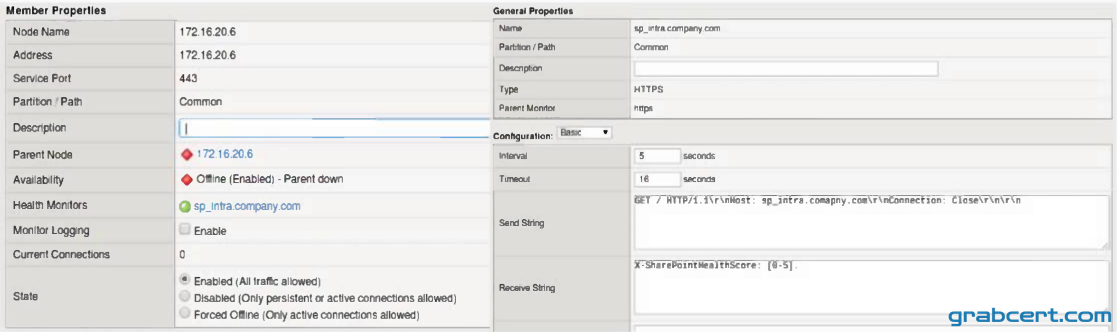
Refer to the exhibit.
A BIG-IP Administrator notices that one of the servers that runs an application is NOT receiving any traffic. The BIG-IP Administrator examines the configuration status of the application and observes the displayed monitor configuration and affected Pool Member status.
What is the possible cause of this issue?
#3Multiple Choice
A BIG-IP Administrator configured a virtual server with a pool of 3 members and selected the Round Robin load balancing method to evenly distribute traffic across the pool members. During initial testing, traffic was not evenly distributed and the pool member 172.16.20.3 received more traffic than the other pool members.
Refer to the exhibit and the virtual server configuration provided below: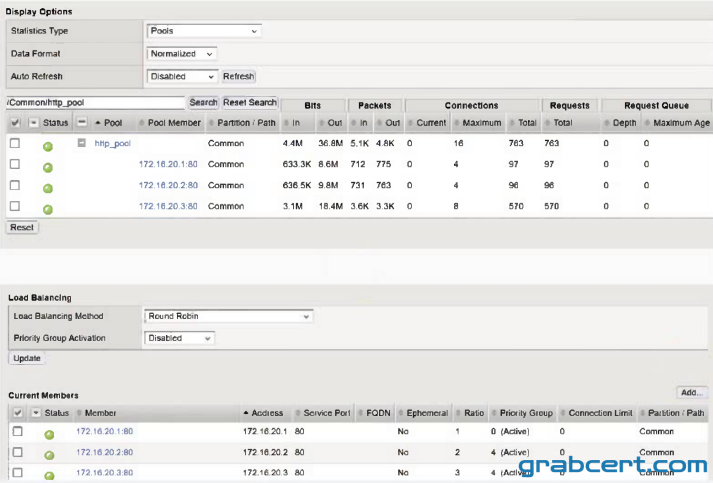 ltm virtual http_vs { destination 10.10.1.100:http ip-protocol tcp mask 255.255.255.255 persist { source_addr { default yes
}
}
pool http_pool
profiles {
tcp{)
}
serverssl-use-sni disabled
source 0.0.0.0/0
source-address-translation {
type automap
}
translate-address enabled
translate-port enabled
}
What is the most likely cause of this behavior?
#4Multiple Choice
During a maintenance window, an EUD test was executed and the output displayed on the screen. The BIG-IP Administrator did NOT save the screen output. The BIG-IP device is currently handling business critical traffic. The BIG-IP Administrator needs to minimize impact.
What should the BIG-IP Administrator do to provide the EUD results to F5 Support?
#5Multiple Choice
What information is required for a BIG-IP Administrator to open an F5 Support ticket?