Back to Exams
MicrosoftAZ-300
Microsoft Azure Architect Technologies
This certification validates practical ability to design, deploy, and operate scalable cloud services, with emphasis on cloud architecture and operations. It is intended for professionals who manage reliable, secure, and cost-aware environments.
Rate this exam
Exam Details
Total Questions
241Last Updated
Aug. 2026Rating
4.9
Question Types
Multi choices
141Drag&Drop
22Simulation
31Hotspot
47 Get Full Access
Unlimited access to all questions
Detailed explanations for every question
Page progress: 2 / 494%
#6Multiple Choice
You have an Azure subscription named Subscription1 that contains an Azure virtual machine named VM1. VM1 is in a resource group named RG1.
VM1 runs services that will be used to deploy resources to RG1.
You need to ensure that a service running on VM1 can manage the resources in RG1 by using the identity of VM1.
What should you do first?
#7Hotspot
HOTSPOT -
You have an Azure subscription named Subscription1. Subscription1 contains the virtual networks in the following table:
Subscription1 contains the virtual machines in the following table: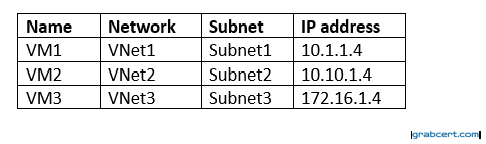
The firewalls on all the virtual machines are configured to allow all ICMP traffic.
You add the peerings in the following table: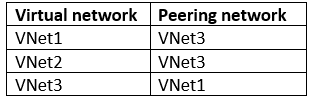
For each of the following statements, select Yes if the statement is true. Otherwise, select No.
NOTE: Each correct selection is worth one point.
Hot Area: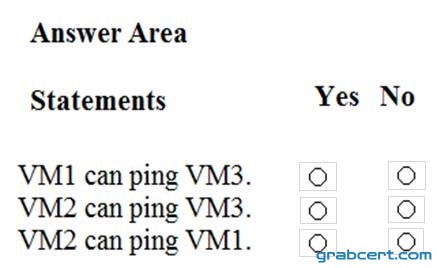
#8Hotspot
HOTSPOT -
You have an Azure Active Directory (Azure AD) tenant.
You need to create a conditional access policy that requires all users to use multi-factor authentication when they access the Azure portal.
Which three settings should you configure? To answer, select the appropriate settings to the answer area.
NOTE: Each correct selection is worth one point.
Hot Area: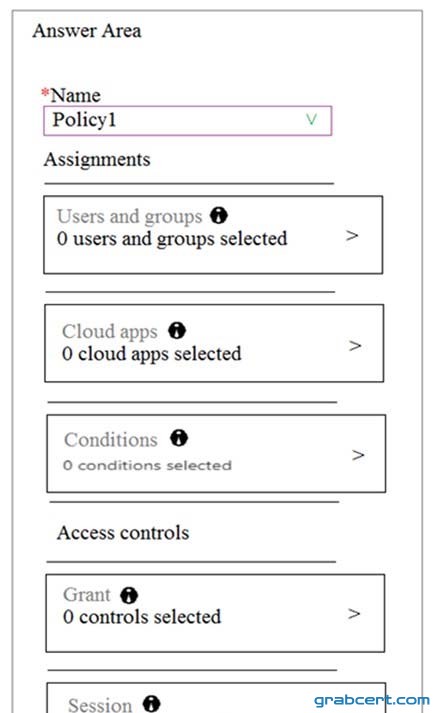
#9Multiple Choice
You configure Azure AD Connect for Azure Active Directory Seamless Single Sign-On (Azure AD Seamless SSO) for an on-premises network.
Users report that when they attempt to access myapps.microsoft.com, they are prompted multiple times to sign in and are forced to use an account name that ends with onmicrosoft.com.
You discover that there is a UPN mismatch between Azure AD and the on-premises Active Directory.
You need to ensure that the users can use single-sign on (SSO) to access Azure resources.
What should you do first?
#10Multiple Choice
You have an Active Directory forest named contoso.com.
You install and configure AD Connect to use password hash synchronization as the single sign-on(SSO) method. Staging mode is enabled.
You review the synchronization results and discover that the Synchronization Service Manager does not display any sync jobs.
You need to ensure that the synchronization completes successfully.
What should you do?