Back to Exams
MicrosoftPL-300
Microsoft Power BI Data Analyst
This certification validates practical skills in business intelligence and reporting, including data preparation, analysis, governance, and communicating reliable insights. It is intended for professionals who build or operate data-driven solutions.
Rate this exam
Exam Details
Total Questions
382Last Updated
Aug. 2026Rating
4.8
Question Types
Multi choices
242Drag&Drop
37Hotspot
103 Get Full Access
Unlimited access to all questions
Detailed explanations for every question
Page progress: 2 / 773%
#6Drag & Drop
DRAG DROP -
In Power Query Editor, you have three queries named ProductCategory, ProductSubCategory, and Product.
Every Product has a ProductSubCategory.
Not every ProductsubCategory has a parent ProductCategory.
You need to merge the three queries into a single query. The solution must ensure the best performance in Power Query.
How should you merge the tables? To answer, drag the appropriate merge types to the correct queries. Each merge type may be used once, more than once, or not at all. You may need to drag the split bar between panes or scroll to view content.
NOTE: Each correct selection is worth one point.
Select and Place: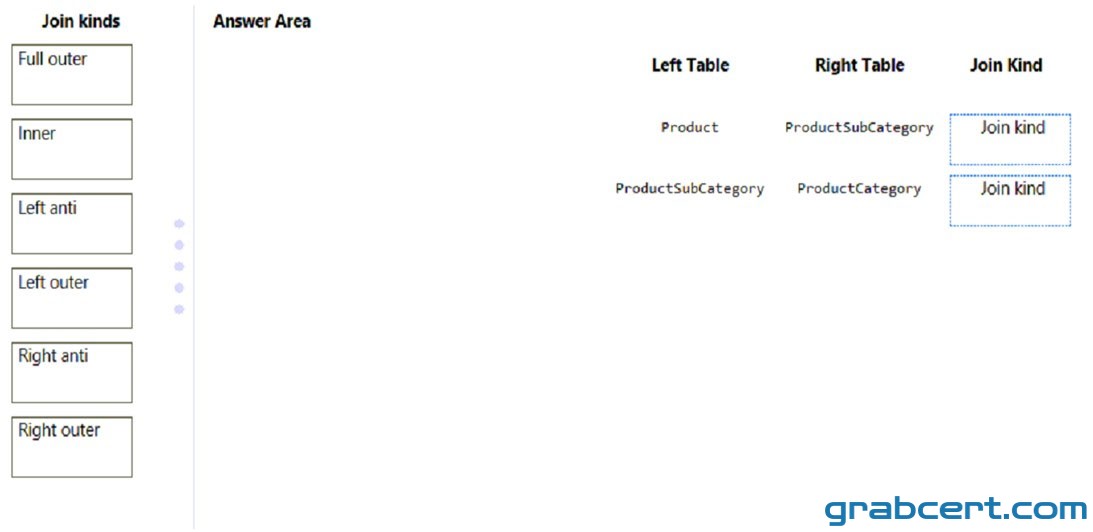
#7Multiple Choice
You are building a Power BI report that uses data from an Azure SQL database named erp1.
You import the following tables.
You need to perform the following analyses:
✑ Orders sold over time that include a measure of the total order value
Orders by attributes of products sold
The solution must minimize update times when interacting with visuals in the report.
What should you do first?
#8Multiple Choice
You have a Microsoft SharePoint Online site that contains several document libraries.
One of the document libraries contains manufacturing reports saved as Microsoft Excel files. All the manufacturing reports have the same data structure.
You need to use Power BI Desktop to load only the manufacturing reports to a table for analysis.
What should you do?
#9Drag & Drop
DRAG DROP -
You have a Microsoft Excel workbook that contains two sheets named Sheet1 and Sheet2.
Sheet1 contains the following table named Table1.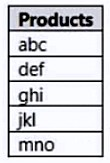
Sheet2 contains the following table named Table2.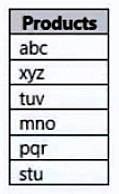
You need to use Power Query Editor to combine the products from Table1 and Table2 into the following table that has one column containing no duplicate values.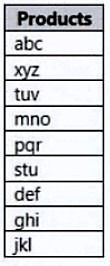
Which three actions should you perform in sequence? To answer, move the appropriate actions from the list of actions to the answer area and arrange them in the correct order.
Select and Place:
#10Multiple Choice
You have a CSV file that contains user complaints. The file contains a column named Logged. Logged contains the date and time each complaint occurred. The data in Logged is in the following format: 2018-12-31 at 08:59.
You need to be able to analyze the complaints by the logged date and use a built-in date hierarchy.
What should you do?