Back to Exams
MicrosoftSC-300
Microsoft Identity and Access Administrator
This certification validates practical cybersecurity skills in identity and access management, including protecting systems, investigating threats, and applying effective controls. It is intended for professionals who assess risk and respond to real-world security scenarios.
Rate this exam
Exam Details
Total Questions
441Last Updated
Aug. 2026Rating
4.7
Question Types
Multi choices
274Drag&Drop
18Simulation
19Hotspot
130 Get Full Access
Unlimited access to all questions
Detailed explanations for every question
Page progress: 1 / 891%
#1Multiple Choice
You have an Azure Active Directory (Azure AD) tenant that contains the following objects:
✑ A device named Device1
✑ Users named User1, User2, User3, User4, and User5
✑ Groups named Group1, Group2, Group3, Group4, and Group5
The groups are configured as shown in the following table.
To which groups can you assign a Microsoft Office 365 Enterprise E5 license directly?
#2Multiple Choice
You have a Microsoft Exchange organization that uses an SMTP address space of contoso.com.
Several users use their contoso.com email address for self-service sign-up to Azure Active Directory (Azure AD).
You gain global administrator privileges to the Azure AD tenant that contains the self-signed users.
You need to prevent the users from creating user accounts in the contoso.com Azure AD tenant for self-service sign-up to Microsoft 365 services.
Which PowerShell cmdlet should you run?
#3Multiple Choice
You have a Microsoft 365 tenant that uses the domain named fabrikam.com. The Guest invite settings for Azure Active Directory (Azure AD) are configured as shown in the exhibit. (Click the Exhibit tab.)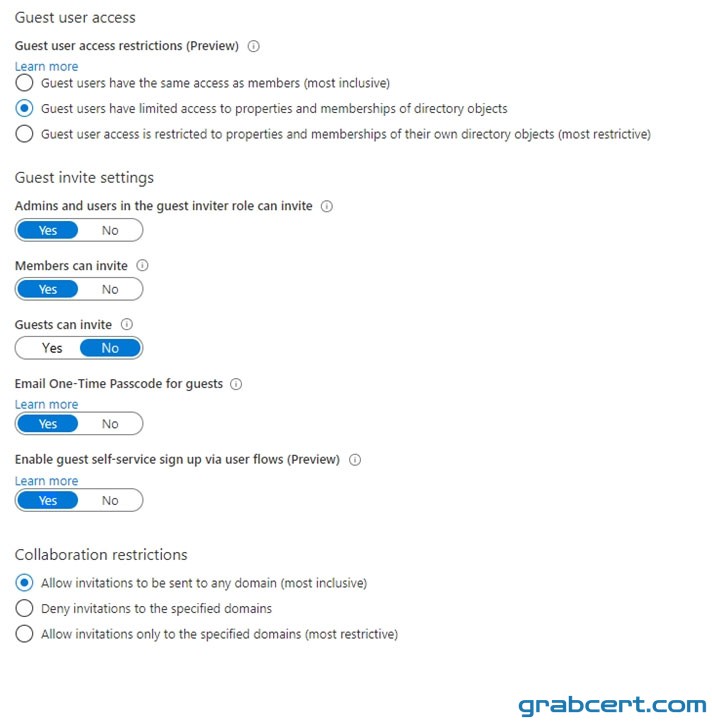
A user named [email protected] shares a Microsoft SharePoint Online document library to the users shown in the following table.
Which users will be emailed a passcode?
#4Multiple Choice
You have 2,500 users who are assigned Microsoft Office 365 Enterprise E3 licenses. The licenses are assigned to individual users.
From the Groups blade in the Azure Active Directory admin center, you assign Microsoft 365 Enterprise E5 licenses to the users.
You need to remove the Office 365 Enterprise E3 licenses from the users by using the least amount of administrative effort.
What should you use?
#5Hotspot
HOTSPOT -
You have a Microsoft 365 tenant named contoso.com.
Guest user access is enabled.
Users are invited to collaborate with contoso.com as shown in the following table.
From the External collaboration settings in the Azure Active Directory admin center, you configure the Collaboration restrictions settings as shown in the following exhibit.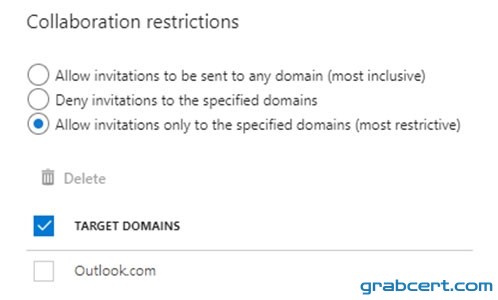
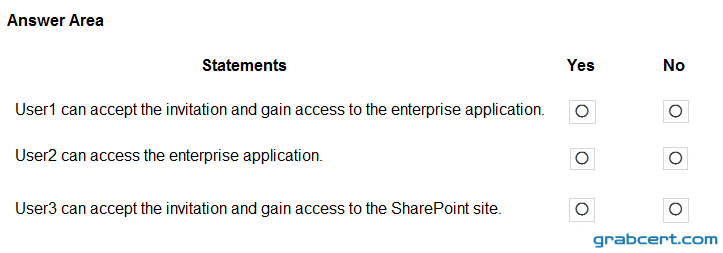
From a Microsoft SharePoint Online site, a user invites [email protected] to the site.
For each of the following statements, select Yes if the statement is true. Otherwise, select No.
NOTE: Each correct selection is worth one point.
Hot Area: